Initiating a payment
- How to generate a payment link
- Integration with initiate
- Integration without redirect(Fast)
- Good to know
- Erreur Status
API Url
Submit all requests to the api URL. All requests are submitted via the HTTP POST method in JSON format
https://sandbox.transfluo.com/checkoutHow to implement the api
To initialize a payment you need to get you merchant credentials and set-up the following information in JSON.
| Variable name | Type | Size | Required | Description |
|---|---|---|---|---|
| apikey note | String | - | Yes |
your apikey(provided by TransFluo) |
| merchant_idnote | String | - | Yes |
your merchant_id(provided by TransFluo) |
| order_idnote | String | - | Yes |
Order identification (unique) |
| amountnote | Integer | - | Yes |
The amount of the transaction must be an integer, no decimal) |
| redirect_url | Url | - | Yes |
The link where the customer will be redirected after the payment |
Integration with redirection
The standard integration consists of posting the initialization parameters to the payment API in order to proceed to the payment url.
Example of query Javascript
    var axios = require('axios');
    var data = JSON.stringify({
      "apikey": "",
      "merchant_id": "",
      "order_id": "YOUR_ORDER_ID_OR_TRANSACTION_ID",
      "amount": 34,
      "redirect_url": "https://example.site/d1dbbb89-52c7-49af-a689-b3c412df820d",
    });

    var config = {
      method: 'post',
      url: 'https://Sandbox.transfluo.com/checkout',
      headers: {
        'Content-Type': 'application/json'
      },
      data : data
    };

    axios(config)
    .then(function (response) {
      console.log(JSON.stringify(response.data));
    })
    .catch(function (error) {
      console.log(error);
    });
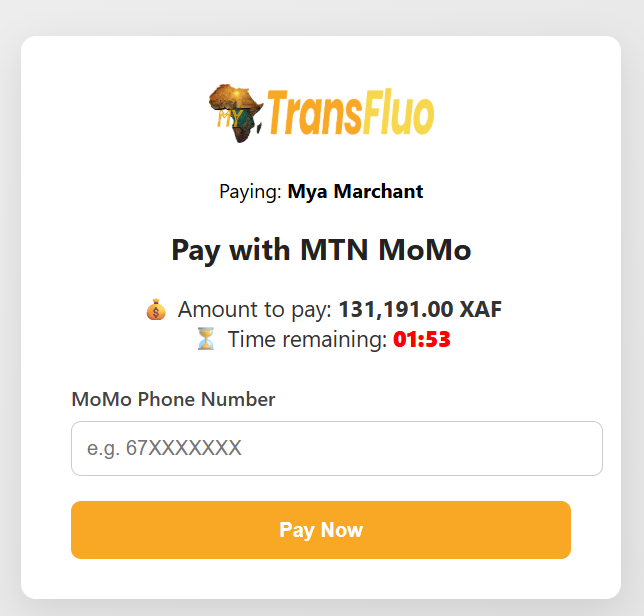
After successfully Setting the payload, user will be redirected to this screen, so he can make his payment.
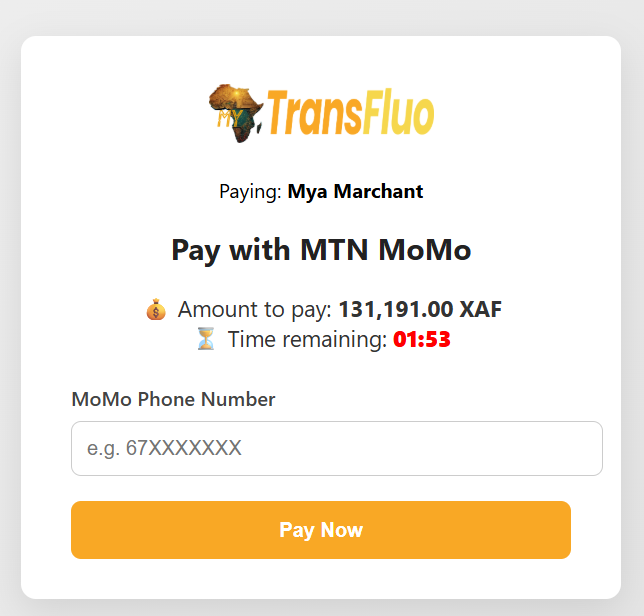
{warning.fa-close}For more security, the payment information must be saved in the database before displaying the counter.
Example of query
{
  "apikey": "",
      "merchant_id": "",
      "order_id": "YOUR_ORDER_ID_OR_TRANSACTION_ID",
      "amount": 34,
      "redirect_url": "https://example.site/d1dbbb89-52c7-49af-a689-b3c412df820d"
      "payment_method": "TransFluo"
}
Example of a successful response to be sent to Webhook url
NB: The merchant_secret_key privately shared with the merchant, which he'll use to decrypt the response
if (in_array($status, ["SUCCESSFUL", "FAILED"]) && !empty($webhook_url)) {
    $webhook_payload = [
        "status" => $status,
        "amount" => $amount,
        "customer" => $tx["customer"],
        "order_id" => $tx["order_id"],
        "reference_id" => $referenceId,
        "merchant_name" => $merchantName,
        "reason" => $reason,
        "timestamp" => date("c"),
    ];

    $payload_json = json_encode($webhook_payload, JSON_UNESCAPED_UNICODE);

    $signature = hash_hmac("sha256", $payload_json, $merchant_secret_key);

    $ch = curl_init($webhook_url);
    curl_setopt($ch, CURLOPT_POST, 1);
    curl_setopt($ch, CURLOPT_POSTFIELDS, $payload_json);
    curl_setopt($ch, CURLOPT_HTTPHEADER, [
        'Content-Type: application/json; charset=UTF-8',
        "X-Mya-Signature: $signature"
    ]);
    curl_setopt($ch, CURLOPT_RETURNTRANSFER, true);
    $webhook_response = curl_exec($ch);
    curl_close($ch);
}
Example of an error response
{
    "code": "ERROR_CODE",
    "message": "ERROR_MESSAGE ",
    "description": "ERROR_DESCRIPTION",
    "api_response_id": "RESPONSE_ID_HERE"
}
Complete Integration To Send Payload
Quickly flow with necessary encryption and decryption to initialize the payload
{secondary.fa-close} crypto.php containing the key to encrypt the payload before sending Full integration Flow
TRY!
    $payload = [
        "merchant_id"  => 'YOUR_MERCHAN_ID',
        "api_key"      => 'YOUR_API_KAY',
        "amount"       => '10500', // XAF for payload
        "order_id"     => 'ORDER_ID',
        "redirect_url" => 'WHERE_YOUR_WILL_REDIRECTED_AFTER_PAYMENT'
    ];

    // Encrypt payload using crypto helper provided after account activation
    $this->load->helper('crypto');
    $token = encryptPayload($payload);

    // Redirect to TransFluo checkout to finalize the payment
    $payment_url = rtrim($merchant['pay_url'], '/') . '?token=' . urlencode($token);
    redirect($payment_url);
Complete Integration To listen To Server Response After a Payment Flow
{secondary.fa-close} merchant_secret_key to decrypt the response using the $signature to read the json response from the server will be given to you after account activationFull integration Flow
TRY!
$payload = file_get_contents('php://input');
$data = json_decode($payload, true);
file_put_contents($logFile, "Raw payload (truncated 1k chars): " . substr($payload, 0, 1000) . "\n", FILE_APPEND);
if (!$data) {
file_put_contents($logFile, "â Invalid JSON received\n", FILE_APPEND);
http_response_code(400);
echo json_encode(["status" => "error", "reason" => "Invalid JSON"]);
return;
}
$signature = $_SERVER['HTTP_X_MYA_SIGNATURE'] ?? '';
$order_id = $data['order_id'] ?? '';
if (!$order_id) {
file_put_contents($logFile, "â Missing order_id in payload\n", FILE_APPEND);
http_response_code(400);
echo json_encode(["status" => "error", "reason" => "Missing order_id"]);
return;
}
$merchant_secret_key = 'YOUR_SECRET_KEY';
// Verify HMAC safely
$check = hash_hmac('sha256', $payload, $merchant_secret_key);
if (!hash_equals((string)$check, (string)$signature)) {
file_put_contents($logFile, "â Invalid HMAC signature\n", FILE_APPEND);
http_response_code(403);
echo json_encode(["status" => "error", "reason" => "Invalid signature"]);
return;
}
file_put_contents($logFile, "â
Signature verified\n", FILE_APPEND);
Good to know
1) amount : The amount must be of Type Integer (no decimals), Must be a positive whole number greater than zero, Currency is alwaysXAFfor now.
- invoice_data
Example:

       (✅ valid): amount: 100

       (❌ invalid): amount: 100.50
- order_id :
- String, unique per transaction.
- Max 64 chars, alphanumeric + - or _.
"order_id": "SHOP123-20250911-0001"
- Apikey : Your apikey is unique, you can use it for your test and production stages.
- merchant_id : Provided by TransFluo when merchant is onboarded.
- Currency: It's always XAF for nor, no need to include it in payload
{info.fa-info}Sandboxes are always available for test before going live
Note: You can switch to live only if your site is working perfectly with sandbox
Live API: https://proxy-api.transfluo.com/checkout